
This document details the way data that have been gathered through DSIDE_REPLAY PL/SQL package can be extracted and used by third-party softwares, using DSIDE_REPLAY_API PL/SQL package, in order to automate monitoring or reporting tasks.
This package is installed by executing dsreplay_api.sql script when connected as d.side Replay user.
Summary of DSIDE_REPLAY_API functions #
DSIDE_REPLAY_API package provides functions to extract data from gathered snapshots.
Most of these functions return a list of (SNAPSHOT, VALUE) that can be interpreted by time series metrics or analytics tools.
Summary of DSIDE_REPLAY_API functions:
| Function | Description |
|---|---|
| GET_PACKAGE_VERSION | Return DSIDE_REPLAY_API package version |
| GET_JOBS_LIST | Return related job name and date of each reference snapshot |
| GET_REF_SNAPS | Return the list of available reference snapshots with details |
| GET_SNAPS_LIST | Return the complete list of available snapshots |
| GET_DB_CPU | Return a time series of Oracle CPU consumption |
| GET_DB_TIME | Return a time series of Oracle DB consumption (CPU + waits) |
| GET_EXECUTE_COUNT | Return a time series of the number of SQL queries executions |
| GET_HOST_CPU | Return a time series of OS CPU consumption |
| GET_LOGICAL_READS | Return a time series of the number of logical reads (blocks) |
| GET_PHYSICAL_READ_BYTES | Return a time series of the amount of IOs (bytes read) |
| GET_PHYSICAL_READS | Return a time series of the number of IOs (blocks read) |
| GET_PHYSICAL_WRITE_BYTES | Return a time series of the amount of IOs (bytes written) |
| GET_PHYSICAL_WRITES | Return a time series of the number of IOs (blocks written) |
| GET_QUERY_STATS | Return a time series of the behavior of a SQL query (CPU, rows…) |
| GET_REDO_SWITCHES | Return a time series of the number of redo logs switches |
| GET_SESSIONS_COUNT | Return a time series of the number of sessions connected |
| GET_SHARED_POOL_FREE_MEM | Return a time series of the size of free memory in shared pool |
| GET_SHARED_POOL_SIZE | Return a time series of the size of the shared pool |
| GET_USER_COMMITS | Return a time series of the number of transactions |
| GET_USER_ROLLBACKS | Return a time series of the amount of rollbacks issued |
| GET_PERIOD_QUERIES | Return a top SQL queries list on a period, sorted by any criteria |
| GET_PERIOD_SEGMENTS | Return a top segments list on a period, for a given statistic |
| GET_PERIOD_WAIT_EVENTS | Return the wait events list for a period |
Note about reference snapshots #
A reference snapshot (REF_SNAP) is the first snapshot of a new capture job, or the first snapshot of a new day.
For more details about the way d.side capture job works, please refer to the Replay capture management guide.
Note about begin_snap and end_snap parameters #
Many functions in the API package can be provided these two optional NUMBER parameters:
| Parameter | Description |
|---|---|
| begin_snap | First snapshot of the selected interval |
| end_snap | Last snapshot of the selected interval |
Rules:
- – If none of these parameters is provided, then no interval is specified, and the function returns every data related to any snapshot in the Replay schema.
- – If both begin_snap and end_snap parameters are provided, then the API is requested to return only rows related to the mentionned interval, from begin_snap to end_snap.
- – If begin_snap is the only parameter provided, then the interval is open on its upper side, and the function returns rows from begin_snap to the last gathered snapshot.
- – If end_snap is the only parameter provided, then the interval is open on its lower side, and the function returns rows from the first available snapshot to the end_snap one.
Examples:
In a Replay schema, 100 snapshots have already been gathered and have a number from 1 to 100.
- – No parameter provided:
Rows related to snapshots 1 (included) to 100 (included) are retrieved. - – Both parameters are provided: (begin_snap=>20, end_snap=>60)
Rows related to snapshots 20 (included) to 60 (included) are retrieved. - – Only begin_snap parameter is provided: (begin_snap=>40)
Rows related to snapshots 40 (included) to 100 (included) are retrieved. - – Only end_snap parameter is provided: (end_snap=>30)
Rows related to snapshots 1 (included) to 30 (included) are retrieved.
Note about API functions usage #
As these functions return rows, selections, restrictions or filters can be applied on the result set.
Usage examples:
SELECT SNAP_DATE, VALUE
FROM
TABLE(DSIDE_REPLAY_API.GET_REDO_SWITCHES)
WHERE SNAP_DATE > SYSDATE-1;
SELECT EVENT, TIME_WAITED
FROM
TABLE(DSIDE_REPLAY_API.GET_PERIOD_WAIT_EVENTS(INSTANCE=>2))
WHERE WAIT_CLASS LIKE '%I/O'
ORDER BY TIME_WAITED DESC;GET_PACKAGE_VERSION #
This function returns the version of the PL/SQL DSIDE_REPLAY_API package.
This information could be requested by d.side software Support.
Syntax
DSIDE_REPLAY_API.GET_PACKAGE_VERSIONUsage sample
SELECT DSIDE_REPLAY_API.GET_PACKAGE_VERSION FROM DUAL;Output format
GET_PACKAGE_VERSION VARCHAR2(10)Output sample
GET_PACKAGE_VERSION
-------------------------
1909051
GET_JOBS_LIST #
This function returns the list of reference snapshots available in the Replay schema, associated to the job they are part of.
Syntax
DSIDE_REPLAY_API.GET_JOBS_LIST (
  BEGIN_SNAP IN NUMBER DEFAULT NULL,
  END_SNAP   IN NUMBER DEFAULT NULL);
Parameters
| Parameter | Description |
|---|---|
| begin_snap | First snapshot of the selected interval |
| end_snap | Last snapshot of the selected interval |
For more details about begin_snap and end_snap usage, please refer to this note.
Usage sample
SELECT * FROM TABLE(DSIDE_REPLAY_API.GET_JOBS_LIST)
ORDER BY REF_SNAP;
Output format
REF_SNAP       NUMBER,
REF_SNAP_DATE  DATE,
JOB_NAME       VARCHAR2(20),
JOB_DATE       DATE
GET_REF_SNAPS #
This function returns the list of reference snapshots that have been gathered, with details about the period they cover.
Syntax
DSIDE_REPLAY_API.GET_REF_SNAPS (
  BEGIN_SNAP IN NUMBER DEFAULT NULL,
  END_SNAP   IN NUMBER DEFAULT NULL);
Parameters
| Parameter | Description |
|---|---|
| begin_snap | First snapshot of the selected interval |
| end_snap | Last snapshot of the selected interval |
For more details about begin_snap and end_snap usage, please refer to this note.
Usage sample
SELECT * FROM TABLE(DSIDE_REPLAY_API.GET_REF_SNAPS(100, 200))
ORDER BY REF_SNAP;
Output format
REF_SNAP       NUMBER,
REF_SNAP_DATE  DATE,
SNAPS_COUNT    NUMBER,    -- Number of snapshots related to the REF_SNAP
LAST_SNAP      NUMBER,    -- Last snapshot related to the REF_SNAP
LAST_SNAP_DATE DATE       -- Date when last snapshot has been taken
GET_SNAPS_LIST #
This function returns the complete list of available snapshots in the Replay schema.
Syntax
DSIDE_REPLAY_API.GET_SNAPS_LIST (
  BEGIN_SNAP IN NUMBER DEFAULT NULL,
  END_SNAP   IN NUMBER DEFAULT NULL);
Parameters
| Parameter | Description |
|---|---|
| begin_snap | First snapshot of the selected interval |
| end_snap | Last snapshot of the selected interval |
For more details about begin_snap and end_snap usage, please refer to this note.
Usage sample
SELECT * FROM TABLE(DSIDE_REPLAY_API.GET_SNAPS_LIST(100, 200))
ORDER BY SNAP_ID;
Output format
SNAP_ID   NUMBER,
SNAP_DATE DATE,
VALUE     NUMBER    -- The REF_SNAP of the snapshot
GET_DB_CPU #
This function returns a time series of CPU consumption, per snapshot.
Syntax
DSIDE_REPLAY_API.GET_DB_CPU (
  BEGIN_SNAP IN NUMBER DEFAULT NULL,
  END_SNAP   IN NUMBER DEFAULT NULL,
  INSTANCE   IN NUMBER DEFAULT 1);
Parameters
| Parameter | Description |
|---|---|
| begin_snap | First snapshot of the selected interval |
| end_snap | Last snapshot of the selected interval |
| instance | RAC instance number |
For more details about begin_snap and end_snap usage, please refer to this note.
Usage sample
SELECT * FROM TABLE(DSIDE_REPLAY_API.GET_DB_CPU(3000, 3400, 2))
ORDER BY SNAP_ID;
Output format
SNAP_ID   NUMBER,
SNAP_DATE DATE,
VALUE     NUMBER    -- DB CPU usage during snapshot (microseconds)
GET_DB_TIME #
This function returns a time series of Oracle DB consumption (CPU + waits), per snapshot.
Syntax
DSIDE_REPLAY_API.GET_DB_TIME (
  BEGIN_SNAP IN NUMBER DEFAULT NULL,
  END_SNAP   IN NUMBER DEFAULT NULL,
  INSTANCE   IN NUMBER DEFAULT 1);
Parameters
| Parameter | Description |
|---|---|
| begin_snap | First snapshot of the selected interval |
| end_snap | Last snapshot of the selected interval |
| instance | RAC instance number |
For more details about begin_snap and end_snap usage, please refer to this note.
Usage sample
SELECT SNAP_DATE, VALUE FROM
TABLE(DSIDE_REPLAY_API.GET_DB_TIME(null, 150))
ORDER BY SNAP_ID;
Output format
SNAP_ID   NUMBER,
SNAP_DATE DATE,
VALUE     NUMBER    -- DB time usage during snapshot (microseconds)
GET_EXECUTE_COUNT #
This function returns a time series of the number of SQL queries executions, per snapshot.
Syntax
DSIDE_REPLAY_API.GET_EXECUTE_COUNT (
  BEGIN_SNAP IN NUMBER DEFAULT NULL,
  END_SNAP   IN NUMBER DEFAULT NULL,
  INSTANCE   IN NUMBER DEFAULT 1);
Parameters
| Parameter | Description |
|---|---|
| begin_snap | First snapshot of the selected interval |
| end_snap | Last snapshot of the selected interval |
| instance | RAC instance number |
For more details about begin_snap and end_snap usage, please refer to this note.
Usage sample
SELECT * FROM TABLE(DSIDE_REPLAY_API.GET_EXECUTE_COUNT)
ORDER BY SNAP_ID;
Output format
SNAP_ID   NUMBER,
SNAP_DATE DATE,
VALUE     NUMBER    -- Number of SQL queries executed during snapshot
GET_HOST_CPU #
This function returns a time series of the OS CPU consumption, per snapshot.
Syntax
DSIDE_REPLAY_API.GET_HOST_CPU (
  BEGIN_SNAP IN NUMBER DEFAULT NULL,
  END_SNAP   IN NUMBER DEFAULT NULL,
  INSTANCE   IN NUMBER DEFAULT 1);
Parameters
| Parameter | Description |
|---|---|
| begin_snap | First snapshot of the selected interval |
| end_snap | Last snapshot of the selected interval |
| instance | RAC instance number |
For more details about begin_snap and end_snap usage, please refer to this note.
Usage sample
SELECT * FROM TABLE(DSIDE_REPLAY_API.GET_HOST_CPU(840))
ORDER BY SNAP_ID;
Output format
SNAP_ID   NUMBER,
SNAP_DATE DATE,
VALUE     NUMBER    -- Host CPU usage during snapshot (percentage)
GET_LOGICAL_READS #
This function returns a time series of logical reads (db block gets + consistent gets), per snapshot.
Syntax
DSIDE_REPLAY_API.GET_LOGICAL_READS (
  BEGIN_SNAP IN NUMBER DEFAULT NULL,
  END_SNAP   IN NUMBER DEFAULT NULL,
  INSTANCE   IN NUMBER DEFAULT 1);
Parameters
| Parameter | Description |
|---|---|
| begin_snap | First snapshot of the selected interval |
| end_snap | Last snapshot of the selected interval |
| instance | RAC instance number |
For more details about begin_snap and end_snap usage, please refer to this note.
Usage sample
SELECT * FROM
TABLE(DSIDE_REPLAY_API.GET_LOGICAL_READS(instance=>2))
ORDER BY SNAP_ID;
Output format
SNAP_ID   NUMBER,
SNAP_DATE DATE,
VALUE     NUMBER    -- Number of blocks requested during snapshot
GET_PHYSICAL_READ_BYTES #
This function returns a time series of the amount of bytes read from disks, per snapshot.
Syntax
DSIDE_REPLAY_API.GET_PHYSICAL_READ_BYTES (
  BEGIN_SNAP IN NUMBER DEFAULT NULL,
  END_SNAP   IN NUMBER DEFAULT NULL,
  INSTANCE   IN NUMBER DEFAULT 1);
Parameters
| Parameter | Description |
|---|---|
| begin_snap | First snapshot of the selected interval |
| end_snap | Last snapshot of the selected interval |
| instance | RAC instance number |
For more details about begin_snap and end_snap usage, please refer to this note.
Usage sample
SELECT * FROM TABLE(DSIDE_REPLAY_API.GET_PHYSICAL_READ_BYTES)
ORDER BY SNAP_ID;
Output format
SNAP_ID   NUMBER,
SNAP_DATE DATE,
VALUE     NUMBER    -- Size of all disk reads during snapshot (bytes)
GET_PHYSICAL_READS #
This function returns a time series of the number of data blocks read from disks, per snapshot.
Syntax
DSIDE_REPLAY_API.GET_PHYSICAL_READS (
  BEGIN_SNAP IN NUMBER DEFAULT NULL,
  END_SNAP   IN NUMBER DEFAULT NULL,
  INSTANCE   IN NUMBER DEFAULT 1);
Parameters
| Parameter | Description |
|---|---|
| begin_snap | First snapshot of the selected interval |
| end_snap | Last snapshot of the selected interval |
| instance | RAC instance number |
For more details about begin_snap and end_snap usage, please refer to this note.
Usage sample
SELECT * FROM TABLE(DSIDE_REPLAY_API.GET_PHYSICAL_READS)
ORDER BY SNAP_ID;
Output format
SNAP_ID   NUMBER,
SNAP_DATE DATE,
VALUE     NUMBER    -- Number of blocks read from disk during snapshot
GET_PHYSICAL_WRITE_BYTES #
This function returns a time series of the amount of bytes written to disks, per snapshot.
Syntax
DSIDE_REPLAY_API.GET_PHYSICAL_WRITE_BYTES (
  BEGIN_SNAP IN NUMBER DEFAULT NULL,
  END_SNAP   IN NUMBER DEFAULT NULL,
  INSTANCE   IN NUMBER DEFAULT 1);
Parameters
| Parameter | Description |
|---|---|
| begin_snap | First snapshot of the selected interval |
| end_snap | Last snapshot of the selected interval |
| instance | RAC instance number |
For more details about begin_snap and end_snap usage, please refer to this note.
Usage sample
SELECT * FROM TABLE(DSIDE_REPLAY_API.GET_PHYSICAL_WRITE_BYTES)
ORDER BY SNAP_ID;
Output format
SNAP_ID   NUMBER,
SNAP_DATE DATE,
VALUE     NUMBER    -- Size of all disk writes during snapshot (bytes)
GET_PHYSICAL_WRITES #
This function returns a time series of the number of data blocks written to disks, per snapshot.
Syntax
DSIDE_REPLAY_API.GET_PHYSICAL_WRITES (
  BEGIN_SNAP IN NUMBER DEFAULT NULL,
  END_SNAP   IN NUMBER DEFAULT NULL,
  INSTANCE   IN NUMBER DEFAULT 1);
Parameters
| Parameter | Description |
|---|---|
| begin_snap | First snapshot of the selected interval |
| end_snap | Last snapshot of the selected interval |
| instance | RAC instance number |
For more details about begin_snap and end_snap usage, please refer to this note.
Usage sample
SELECT * FROM TABLE(DSIDE_REPLAY_API.GET_PHYSICAL_WRITES)
ORDER BY SNAP_ID;
Output format
SNAP_ID   NUMBER,
SNAP_DATE DATE,
VALUE     NUMBER    -- Number of blocks written to disk during snapshot
GET_QUERY_STATS #
This function returns a time series of the main statistics about a SQL query behavior, per snapshot, including elapsed time, CPU, I/O, number of rows, blocks…
Syntax
DSIDE_REPLAY_API.GET_QUERY_STATS (
  SQLID      IN VARCHAR2,
  BEGIN_SNAP IN NUMBER DEFAULT NULL,
  END_SNAP   IN NUMBER DEFAULT NULL,
  INSTANCE   IN NUMBER DEFAULT 1);
Parameters
| Parameter | Description |
|---|---|
| sqlid | Oracle SQL_ID of the query to be analyzed |
| begin_snap | First snapshot of the selected interval |
| end_snap | Last snapshot of the selected interval |
| instance | RAC instance number |
For more details about begin_snap and end_snap usage, please refer to this note.
Usage sample
SELECT * FROM
TABLE(DSIDE_REPLAY_API.GET_QUERY_STATS('bcv9qynmu1nv9'))
ORDER BY SNAP_ID;
Output format
SNAP_ID           NUMBER,
SNAP_DATE         DATE,
ELAPSED_TIME      NUMBER,    -- Elapsed time used by query (microseconds)
EXECUTIONS        NUMBER,    -- Number of times the query was executed
BUFFER_GETS       NUMBER,    -- Number of blocks used by the query
DISK_READS        NUMBER,    -- Number of disk reads for the query
CPU_TIME          NUMBER,    -- CPU time used by query (microseconds)
ROWS_PROCESSED    NUMBER,    -- Total number of rows returned
USER_IO_WAIT_TIME NUMBER     -- User IO wait time for query (microseconds)
GET_REDO_SWITCHES #
This function returns a time series of the number of redo logs switches that occured, per hour.
Syntax
DSIDE_REPLAY_API.GET_REDO_SWITCHES (
  INSTANCE IN NUMBER DEFAULT 1);
Parameters
| Parameter | Description |
|---|---|
| instance | RAC instance number |
Usage sample
SELECT * FROM TABLE(DSIDE_REPLAY_API.GET_REDO_SWITCHES)
ORDER BY SNAP_DATE;
Output format
SNAP_ID   NUMBER,    -- 0
SNAP_DATE DATE,      -- Hour when occured the redo logs switch(es)
VALUE     NUMBER     -- Number of redo logs switch(es), during this hour
GET_SESSIONS_COUNT #
This function returns a time series of the number of sessions connected per snapshot.
Syntax
DSIDE_REPLAY_API.GET_SESSIONS_COUNT (
  BEGIN_SNAP IN NUMBER DEFAULT NULL,
  END_SNAP   IN NUMBER DEFAULT NULL,
  INSTANCE   IN NUMBER DEFAULT 1);
Parameters
| Parameter | Description |
|---|---|
| begin_snap | First snapshot of the selected interval |
| end_snap | Last snapshot of the selected interval |
| instance | RAC instance number |
For more details about begin_snap and end_snap usage, please refer to this note.
Usage sample
SELECT * FROM TABLE(DSIDE_REPLAY_API.GET_SESSIONS_COUNT)
ORDER BY SNAP_ID;
Output format
SNAP_ID   NUMBER,
SNAP_DATE DATE,
VALUE     NUMBER    -- Number of sessions connected at snapshot time
GET_SHARED_POOL_FREE_MEM #
This function returns a time series of the amount of available free memory in shared pool, per snapshot.
Syntax
DSIDE_REPLAY_API.GET_SHARED_POOL_FREE_MEM (
  BEGIN_SNAP IN NUMBER DEFAULT NULL,
  END_SNAP   IN NUMBER DEFAULT NULL,
  INSTANCE   IN NUMBER DEFAULT 1);
Parameters
| Parameter | Description |
|---|---|
| begin_snap | First snapshot of the selected interval |
| end_snap | Last snapshot of the selected interval |
| instance | RAC instance number |
For more details about begin_snap and end_snap usage, please refer to this note.
Usage sample
SELECT * FROM TABLE(DSIDE_REPLAY_API.GET_SHARED_POOL_FREE_MEM)
ORDER BY SNAP_ID;
Output format
SNAP_ID   NUMBER,
SNAP_DATE DATE,
VALUE     NUMBER    -- Size of free memory available in shared pool (bytes)
GET_SHARED_POOL_SIZE #
This function returns a time series of the shared pool size, per snapshot.
Syntax
DSIDE_REPLAY_API.GET_SHARED_POOL_SIZE (
  BEGIN_SNAP IN NUMBER DEFAULT NULL,
  END_SNAP   IN NUMBER DEFAULT NULL,
  INSTANCE   IN NUMBER DEFAULT 1);
Parameters
| Parameter | Description |
|---|---|
| begin_snap | First snapshot of the selected interval |
| end_snap | Last snapshot of the selected interval |
| instance | RAC instance number |
For more details about begin_snap and end_snap usage, please refer to this note.
Usage sample
SELECT * FROM TABLE(DSIDE_REPLAY_API.GET_SHARED_POOL_SIZE)
ORDER BY SNAP_ID;
Output format
SNAP_ID   NUMBER,
SNAP_DATE DATE,
VALUE     NUMBER    -- Shared pool size (bytes)
GET_USER_COMMITS #
This function returns a time series of the number of transactions committed by users, per snapshot.
Syntax
DSIDE_REPLAY_API.GET_USER_COMMITS (
  BEGIN_SNAP IN NUMBER DEFAULT NULL,
  END_SNAP   IN NUMBER DEFAULT NULL,
  INSTANCE   IN NUMBER DEFAULT 1);
Parameters
| Parameter | Description |
|---|---|
| begin_snap | First snapshot of the selected interval |
| end_snap | Last snapshot of the selected interval |
| instance | RAC instance number |
For more details about begin_snap and end_snap usage, please refer to this note.
Usage sample
SELECT * FROM TABLE(DSIDE_REPLAY_API.GET_USER_COMMITS)
ORDER BY SNAP_ID;
Output format
SNAP_ID   NUMBER,
SNAP_DATE DATE,
VALUE     NUMBER    -- Number of transactions validated during snapshot
GET_USER_ROLLBACKS #
This function returns a time series of the number of times users manually issued a ROLLBACK statement or an error occured during a transaction, per snapshot.
Syntax
DSIDE_REPLAY_API.GET_USER_ROLLBACKS (
  BEGIN_SNAP IN NUMBER DEFAULT NULL,
  END_SNAP   IN NUMBER DEFAULT NULL,
  INSTANCE   IN NUMBER DEFAULT 1);
Parameters
| Parameter | Description |
|---|---|
| begin_snap | First snapshot of the selected interval |
| end_snap | Last snapshot of the selected interval |
| instance | RAC instance number |
For more details about begin_snap and end_snap usage, please refer to this note.
Usage sample
SELECT * FROM TABLE(DSIDE_REPLAY_API.GET_USER_ROLLBACKS(850))
ORDER BY SNAP_ID;
Output format
SNAP_ID   NUMBER,
SNAP_DATE DATE,
VALUE     NUMBER    -- Number of rollback statements issued
GET_PERIOD_QUERIES #
This function returns a list of SQL queries for a period, with their main statistics, including elapsed time, CPU, I/O, number of rows, blocks… based on a “top” criteria (elapsed time, number of rows…).
Syntax
DSIDE_REPLAY_API.GET_PERIOD_QUERIES (
  BEGIN_SNAP    IN NUMBER   DEFAULT NULL,
  END_SNAP      IN NUMBER   DEFAULT NULL,
  INSTANCE      IN NUMBER   DEFAULT 1,
  LIMIT         IN NUMBER   DEFAULT 20,
  ORDERBYCOLUMN IN VARCHAR2 DEFAULT 'ELAPSED_TIME',
  SYSQUERIES    IN CHAR     DEFAULT 'N',
  USERNAME      IN VARCHAR2 DEFAULT NULL);
Parameters
| Parameter | Description |
|---|---|
| begin_snap | First snapshot of the selected interval |
| end_snap | Last snapshot of the selected interval |
| instance | RAC instance number |
| limit | Maximum number of rows returned by the function |
| orderbycolumn | Criteria used to fetch the top queries. Can be one of the output columns of the function: ELAPSED_TIME, EXECUTIONS, BUFFER_GETS, DISK_READS, CPU_TIME, ROWS_PROCESSED, USER_IO_WAIT_TIME Tip: several criteria can be mixed (see example below). |
| sysqueries | Allow internal queries (SYS, SYSTEM… ) to be retrieved |
| username | Retrieve only queries that have been parsed by a given user |
For more details about begin_snap and end_snap usage, please refer to this note.
Usage samples
SELECT * FROM TABLE(DSIDE_REPLAY_API.GET_PERIOD_QUERIES(
limit=>10, orderbycolumn=>'executions', username=>'MYAPP'));
Mixed “order by” criteria to get SQL queries sorted by average execution time:
SELECT * FROM TABLE(DSIDE_REPLAY_API.GET_PERIOD_QUERIES(
orderbycolumn=>'elapsed_time/greatest(executions,1)'));
Output format
SQL_ID              VARCHAR2(16),
PARSING_SCHEMA_NAME VARCHAR2(128),    -- User who executed the query
SQL_TEXT            VARCHAR2(1000),
ELAPSED_TIME        NUMBER,           -- Elapsed time used by the query (microseconds)
EXECUTIONS          NUMBER,           -- Number of times the query was executed
BUFFER_GETS         NUMBER,           -- Number of blocks used by the query
DISK_READS          NUMBER,           -- Number of disk reads for the query
CPU_TIME            NUMBER,           -- CPU time used by query (microseconds)
ROWS_PROCESSED      NUMBER,           -- Total number of rows returned by the query
USER_IO_WAIT_TIME   NUMBER            -- User IO wait time for query (microseconds)
GET_PERIOD_SEGMENTS #
This function returns a list of top segments on a period, for a given statistic (logical reads, physical reads, ITL waits, row lock waits, segment scans…).
Syntax
DSIDE_REPLAY_API.GET_PERIOD_SEGMENTS (
  STATNAME   IN VARCHAR2,
  BEGIN_SNAP IN NUMBER DEFAULT NULL,
  END_SNAP   IN NUMBER DEFAULT NULL,
  INSTANCE   IN NUMBER DEFAULT 1,
  LIMIT      IN NUMBER DEFAULT 20);
Parameters
| Parameter | Description |
|---|---|
| statname | Statistic to base the top segments on |
| begin_snap | First snapshot of the selected interval |
| end_snap | Last snapshot of the selected interval |
| instance | RAC instance number |
| limit | Maximum number of rows returned by the function |
For more details about begin_snap and end_snap usage, please refer to this note.
Usage sample
SELECT * FROM TABLE(DSIDE_REPLAY_API.GET_PERIOD_SEGMENTS(
statname=>'physical reads', limit=>10));
Output format
OWNER          VARCHAR2(128),    -- Segment owner
OBJECT_TYPE    VARCHAR2(23),     -- Segment type
OBJECT_NAME    VARCHAR2(128),    -- Segment name
SUBOBJECT_NAME VARCHAR2(128),    -- Partition name if relevant
VALUE          NUMBER            -- Statistic value
GET_PERIOD_WAIT_EVENTS #
This function returns the list of every wait event detected during a period.
Syntax
DSIDE_REPLAY_API.GET_PERIOD_WAIT_EVENTS (
  BEGIN_SNAP IN NUMBER DEFAULT NULL,
  END_SNAP   IN NUMBER DEFAULT NULL,
  INSTANCE   IN NUMBER DEFAULT 1);
Parameters
| Parameter | Description |
|---|---|
| begin_snap | First snapshot of the selected interval |
| end_snap | Last snapshot of the selected interval |
| instance | RAC instance number |
For more details about begin_snap and end_snap usage, please refer to this note.
Usage sample
SELECT * FROM TABLE(DSIDE_REPLAY_API.GET_PERIOD_WAIT_EVENTS)
ORDER BY TIME_WAITED DESC;
Output format
EVENT       VARCHAR2(64),    -- Wait event name
WAIT_CLASS  VARCHAR2(64),    -- Wait class the event is part of
TIME_WAITED NUMBER           -- Time spent on this wait event (cs, hundredths of a second)
Replay API and REST services #
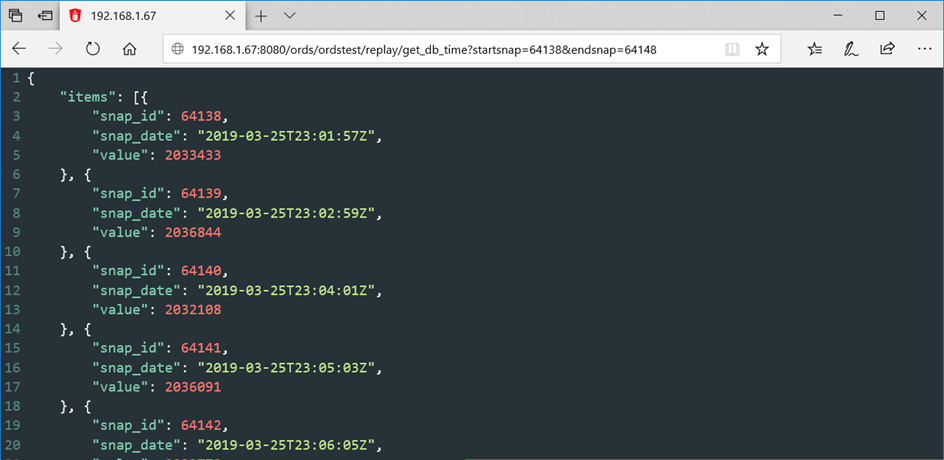
Oracle provides Oracle REST Data Services (ORDS), allowing to use d.side Replay API through web services. This feature has been tested with d.side Replay API, and is very easy to deploy.
For more information about ORDS and its implementation, please refer to https://docs.oracle.com/en/database/oracle/oracle-rest-data-services/index.html
Example
REST service creation #
BEGIN
  ORDS.DEFINE_SERVICE(
    P_MODULE_NAME => 'replay',
    P_BASE_PATH   => '/replay/',
    P_PATTERN     => 'get_db_time',
    P_SOURCE      =>
      'SELECT SNAP_ID, SNAP_DATE, VALUE FROM TABLE(
      REPLAY.DSIDE_REPLAY_API.GET_DB_TIME(:STARTSNAP, :ENDSNAP, :INSTANCE))
      ORDER BY SNAP_ID'
  );
  COMMIT;
END;
/
REST Service call #
Other API and REST service example #
For another example of Replay API and REST service usage, refer to d.side blog:
https://dside-software.com/en/api-d-side-replay/


