
Unlike d.side Live, able to monitor an Oracle activity currently being processed, d.side Interactive Replay can be used to check what happened on a database, in a past period.
To be able to have a look at this history, a snapshots collection, name capture, must have been previously activated.
The Replay gathering job is in charge of taking the snapshots.
And these snapshots are stored in a specific Oracle schema, named Replay schema and located within the monitored database.
Following picture shows how d.side interacts with Oracle in real time usage:

The following picture shows how d.side works with Replay:

The capture job, in the first arrow, gathers Oracle GV$ views content to be stored into the DSIDE$ tables of the dedicated Replay schema. This job can run 24×7.
When running d.side Replay, DSIDE$ tables content is used to review what happened at capture time.
Like redo logs in Oracle architecture, the DSIDE$ tables are used in a circular manner, to reuse the tables and store all the snapshots for a given day into the same table set.
The day after, the table set moves (from 01 to 02, then from 02 to 03, then from 03 to 04 and then from 04 back to 01, and so on, if four table sets have been created).
Example of day switch with four tables sets:
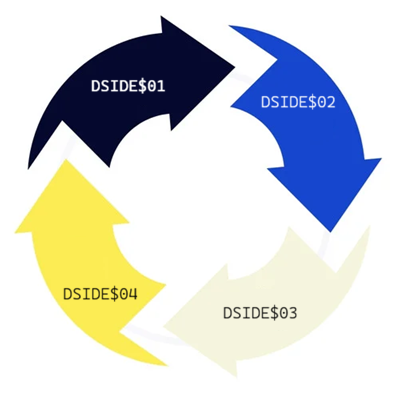
When creating the Replay schema, the user is asked the number of days to be kept. If the application managers need to be able to go back 3 days ago for investigation, then, the user should answer 3 for the number of days to be kept, and then 4 (four) DSIDE$ tables will be created. That way, Replay will always be able to retrieve the data matching 3 days ago, while populating the current day.
The collect job gathers data from several Oracle GV$ views and stores them into as many DSIDE$ tables. These tables constitute a “table set”, named 01, 02… and each day is independent of the others, while every snapshots taken during the day are stored in the same “table set”. At the end of the day, the capture job performs a “day switch”.
The maximum number of days that can be kept is 98. That means 99 table sets can be created. If the user needs to store more tables or to keep a given day as a reference, a standard copy (table copy, Oracle export…) is sufficient to move or replicate the collected data. Please refer to “d.side export Replay day” and “d.side import Replay day” procedures.
Retention (number of days kept) and the whole Replay schema can easily be managed. Refer to manage Replay schema for more details.
The present guide explains how to install and run the gathering job, and what parameters can be used to tune storage usage or performances.


